FAQ Licenses AI Credits Omnibooth Studio Omnibooth 360 Studio About us Affiliates Blog

Omnibooth 360 Studio · Android App

360 Photobooth App for Android

Your phone is the brain of your 360 platform. Record, process and deliver the video from the same device, with slow motion, boomerang, music and overlays. No computer and no mandatory subscription.

Android 10 or higherPhone camera or GoProQR over local network+1 free license
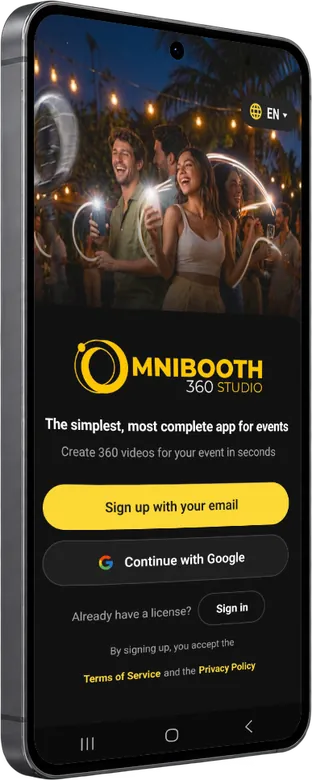
Omnibooth 360 Studio 360 photobooth app on an Android phone: home screen

Omnibooth 360 Studio: app for 360 photobooths (360 platform or 360 booth)

Omnibooth 360 Studio is one of the most complete apps on the market, designed specifically for event professionals who run 360 photobooths (also called 360 video booths, spinners or 360 platforms).

It is currently available for Android on Google Play (Play Store). Here are its most outstanding features:

Camera compatibility

It connects wirelessly to GoPro cameras (models 7 to 13), the industry standard for the 360 photobooth, to achieve smooth, high-quality videos. It also works with the camera of the smartphone where you install the app, although it may have more technical limitations than a GoPro, which records on its own without relying on the phone's hardware.

360 capture modes (Omnicontrol 360)

4 preset 360 capture modes and the freedom to create your own style with no limits. It includes two types of boomerang:

  • Classic: the reverse plays at the same speed as the forward motion.
  • Premium: every slow-motion section on the way forward plays in fast motion on the reverse.

Customization and branding

For weddings, corporate events and celebrations of all kinds, you customize the whole guest experience:

  • Multiple frames (overlays) to place over your 360 videos, 100% editable.
  • Your company logo or the couple's names at a wedding.
  • Your own music, with up to 3 different songs per event.

Sharing, even without internet

Delivering the 360 video quickly is key at an event:

  • Instantly via QR code or WhatsApp.
  • Offline mode: in places with no coverage, the app shares files between devices over a local connection.
  • External screens: send freshly recorded videos to a wirelessly connected tablet so guests can access them easily.

Free hosting

Files are hosted in the cloud at no cost: we don't charge for storing them, unlike our competitors.

Best price

The most affordable 360 app on the market, with a lifetime license option.

Launch offer

With an annual or lifetime license we give you a second license for another device, at no extra cost. See licenses

From spin to QR, on a single screen

No computer, cables or second monitor. The guest steps onto the platform, you record, the app processes and the QR code appears over the finished video. While one group downloads theirs, you're already recording the next.

  1. 1

    Record

    Trigger it remotely, with the motion sensor or by pressing the REC button, with a live preview.

  2. 2

    Process

    Slow motion, boomerang, effects, intro, outro, overlay and music.

  3. 3

    Deliver

    Videos can live in the cloud, on a local network (no internet) or be sent via WhatsApp.

  4. 4

    Repeat

    One button takes you to the event gallery and another to record the next video.

Licenses and pricing

Download the app and try it for free: the free version adds a watermark to videos.

Weekly License

Perfect for a single event

€8.99

/ week

All modes, no watermark.

Monthly License

Only when you need it

€21.99

/ month

All modes, no watermark.

Launch offer

Annual License

A full year

€239

/ year

+1 free license: two devices at the same time for the price of one.

Launch offer

Lifetime License

One-time payment · no fees

€349

forever

+1 free license: two devices at the same time for the price of one.

Prices exclude taxes. The period starts the day you activate the license in the app, not the day of purchase. The Omnibooth 360 Studio license is exclusive to Android; if you want to cover PC and Android with a single payment, choose the Omnibooth Studio license for Windows.

Frequently asked questions about the Omnibooth 360 Studio app

What is the difference between Omnibooth 360 Studio and Omnibooth Studio?

Omnibooth 360 Studio is the Android app specialized in the 360 photobooth: it records, processes and delivers the video right from your phone. Omnibooth Studio is the complete software for Windows PC and brings together the classic photobooth, the AI photobooth and the 360 videobooth.

Does Omnibooth 360 Studio have Artificial Intelligence?

Omnibooth 360 Studio is specialized in 360 video. To access the AI photobooth features you need the PC version, Omnibooth Studio for Windows, which includes more than 30 styles and the ability to create your own. The two tools complement each other to cover all your services.

Do I need a GoPro, or is my phone camera enough?

Both options work. You can wirelessly connect a GoPro (models 7 to 13), the 360 photobooth standard, or record with the phone's own camera, choosing the real lens, resolution and fps your hardware supports. With a GoPro you get the most out of the quality, because it doesn't depend on the phone's hardware.

Can I use my license on PC and on Android?

Yes. If you buy an annual or lifetime license for Omnibooth Studio for PC, you get a second license for free that you can use in the Omnibooth 360 Studio app for Android.

Can I deliver videos without internet at the event?

Yes. The app runs its own server on the local network: the guest scans the QR code that appears next to the freshly processed video and downloads it without needing internet. When there is a connection, you can also keep the videos in the cloud or send them via WhatsApp.

What does my phone need to run the app?

It works on phones with Android 10 or higher and a 64-bit processor (arm64). The more powerful the phone, the faster it processes, and resolution, fps and the encoding preset are configurable to suit each device.

Is Omnibooth 360 Studio already compatible with iPhone or iPad?

We are in full development of the iOS version, which will arrive in 2027.

Get started with your 360 platform today

Try it for free and see for yourself how fast it processes on your own phone. If you need help, write to us at support@omniboothstudio.com.